
דילוג לתוכןSkip to content

Customers

Who each customer is, what they buy, how often, and what they're worth.

A customer has bought from you for years, sometimes with one email, sometimes with another phone. Who knows it's the same person, and what they're worth to your business?

Building a customer file

One customer. Four orders.In your lists, four strangers.

It starts when she signs in.

Demo data

Her email and phone are where the search begins.

  1. From the old store

    noa.l•••@gmail.com2024

    Same email as the account

    Placed through your previous store, with the same email. It joins the file too.

  2. Guest checkout

    +972 54-•••-12342025

    Same phone, different format

    The order says +972, the account says 054. The system checks both formats, and it's the same number.

  3. Gift from another email

    noa.g•••@gmail.com2025

    New email, her phone

    The email is new, but the phone on the order is hers. From now on, that email is linked to her account.

  4. Company ID on the order

    054-•••-12342026

    Same phone, business invoice

    Same phone, plus a company ID on the order. A sure sign she also buys for a business.

N.L

Customer file·Noa L.

Demo data
Signed in withnoa.l•••@gmail.com054-•••-1234noa.g•••@gmail.com

Orders on file4

  • 2024Old store
  • 2025Guest
  • 2025Mom's gift
  • 202612 gift boxes
  • PersonaFamily buyerHigh confidence, from 4 orders
  • Business customerHigh certaintyCompany ID on one order
  • When to reach out14 days before Mom's birthdayA date she saved in her account
A different Noa L.n.levi•••@gmail.comStays out

And what isn't hers stays out.

Same name, different email and phone. A name alone never links an order to anyone.

Now it's one file.

Four orders. One file.

And it knows when to reach out.

Every order is checked against the email and phone already on the account. Only orders that pass make it into the file.

Live todaySee exactly what runs
  • When a customer signs in, the system finds orders by their email and phone, in both Israeli phone formats. It learns from those orders which other emails and phones are theirs, and attaches only orders whose billing details fall inside that set.

    LIVEidentity-graph-order-claim

  • Every order from your previous store is kept and merged into each customer's file. A rule makes sure orders from the migration period don't count twice.

    LIVEmerged-shopify-woo-history

  • Every customer gets one of ten plain-language personas, with a confidence level, based on how recently they bought, how often, and how much they spent.

    LIVErfm-persona-engine

  • Business customers are identified from evidence and get a certainty level, not a score. A company ID or VAT number on the order, or an invoice in a business name, puts them at the high level.

    LIVEbusiness-detect-tiers

  • Customers save the people they care about, and their dates, in their account. 14 days before a birthday or anniversary, they get a reminder with gift ideas.

    LIVErecipients-gift-reminders

That was the demo.

Here's the real screen.

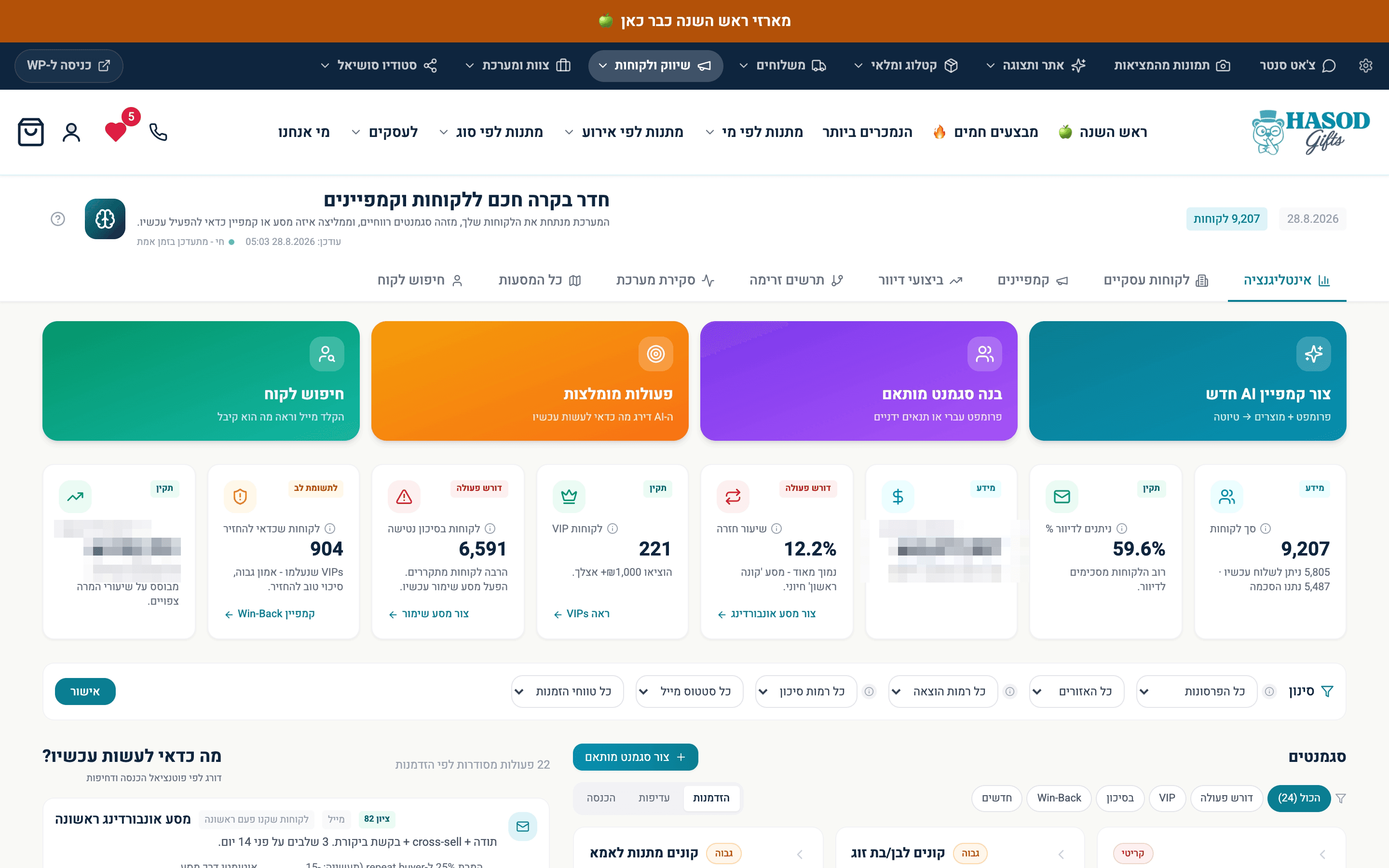
The customers screen at the business where MOVA was built: segments drawn from real buying behavior. Two revenue figures are blurred.

9,207 customers, sorted by who should hear from you and why. 904 of them are worth winning back.A real screen from the system

9,207 customers, sorted by who should hear from you and why. 904 of them are worth winning back.

The system MOVA was built on

What the Customers department does

  1. Old orders find the customer

    Live todayHow it works
    • When a customer signs in, the system finds orders by their email and phone, learns from those orders which other emails and phones are theirs, and attaches only orders whose billing details fall inside that set. So someone who bought for years without an account sees their full history the day they sign up.

      LIVEidentity-graph-order-claim

  2. Full history, previous store included

    Live todayHow it works
    • Orders from your previous store are kept in full and merged into each customer's file and timeline. An order from the migration period counts once, and two real purchases on the same day still count as two.

      LIVEmerged-shopify-woo-history

  3. A persona and score for every customer

    Live todayHow it works
    • Every customer gets a score based on how recently they bought, how often, and how much they spent, plus one of ten plain-language personas with a confidence level and a one-line description. If the customer named the relationship at checkout, that overrides any guess from the products, and orders returned in full are left out.

      LIVErfm-persona-engine

  4. Spots business customers on its own

    Live todayHow it works
    • Every file is checked for evidence: the name, the email domain and the buying pattern. You get a certainty level, not a score, with the reasons in plain language. A mistyped free email domain doesn't count as a company domain.

      LIVEbusiness-detect-tiers

  5. A reminder 14 days before the date

    Live todayHow it works
    • Customers save the people they care about, and their dates, in their account. 14 days before a birthday or anniversary, they get a message with gift ideas based on that person's interests. Each event gets one reminder a year.

      LIVErecipients-gift-reminders

  6. Email, too: campaigns from one request

    Live todayHow it works
    • Pick an audience, say what you want in plain language, and get a subject line, preview text and a designed, on-brand email. Ask for changes in your own words and the system comes back with a suggestion. The campaign stays a draft until you approve it. The AI writes the copy only; the design is fixed and approved in advance.

      LIVEai-campaign-writer

  7. Customers who buy the same month every year

    Live todayHow it works
    • The system spots customers who buy around the same date every year and, two weeks before their window, sends a personal reminder with what they bought last year and a new idea. Each customer gets one reminder a year per event, and every send goes through the consent check.

      LIVEannual-window-reminders

  8. Keeps customers posted after they pay

    Live todayHow it works
    • After purchase, the customer gets a branded email at every stage: order received, being prepared, shipped and delivered. Each stage goes out only once per order, so nobody gets the same message twice.

      LIVEtransactional-order-email

  9. Customer data, properly protected

    Live todayHow it works
    • Customers see their orders only after verifying a code sent to their phone, and the server checks identity against the signed-in account, not against whatever the request claims. A phone number that's typed in but not verified doesn't open any order.

      LIVEidentity-otp-order-access

  10. Opt out of one channel, out of all

    Live todayHow it works
    • Anyone who opts out of texts stops getting emails too, and vice versa. The opt-out is written to the database itself and copied to the other channel in the same step, so no sender can miss it. Opt-outs spread across channels. Re-subscribing never does.

      LIVEcross-channel-suppression

  11. Paying customers show up within seconds

    Live todayHow it works
    • The moment a payment is approved, the system pulls that customer's full order history, previous store included, and recalculates their file and segments. An order that isn't paid yet doesn't update the file.

      LIVErealtime-profile-on-payment

Who the Customers department talks to

What they decide together

Each row is one department and the decision their conversation leads to. Pick a row to see the conversation.

CustomersService

A customer writes in chat. The rep already knows who they are.

Illustration
  1. CustomersReturning customer: six orders, mostly gifts for mom, around the holidays.
  2. ServiceRep: Hi again. Another gift box for mom? This year there's a version with a handwritten card, too.

Reps start from who the customer actually is, not from a blank form.

Live todaySee exactly what runs
  • When a rep joins a conversation, the side panel shows who the customer is: who they usually buy for, for which occasions, past orders (including the previous system) and past conversations. The profile is rebuilt nightly, and the panel shows when it was last updated.

    LIVEcustomer-360-panel

Open Service

The question we get about this department

What if two different people end up in one file?

An order joins an account only if its email or phone already belongs to that person, based on their own orders. A matching name alone never links an order. In the business customer list, a shared phone merges two addresses only when the names back it up.

Live todaySee exactly what runs
  • Identity comes from the signed-in account, not from whatever the request sends. A phone counts as theirs only if it appeared with the account's email on the same order, and an email counts only if it appeared with the verified phone. Orders with billing details outside that set aren't attached.

    LIVEidentity-graph-order-claim

  • The business customer list is merged into organizations by a shared email domain, an identical or near-identical business name, and a shared phone only when the names also share words. A customer's first name never merges anything, and numbers known not to be a customer's, like the store's own number, are blocked.

    LIVEbusiness-directory-org-merge