
דילוג לתוכןSkip to content

Marketing

What you spent, what came back, and what you can spend tomorrow.

The platform says the campaign is working. Do you scale up tomorrow, or is every extra order losing you money?

What the campaign leaves you

7.2x return.How much do you actually keep?

Demo data

Platform-reported ROAS

7.2

Every ₪1 in ads brought back ₪7.20 in sales.

One order from the campaign.

The customer paid ₪289.00. Now subtract every shekel spent along the way.

One order from the campaignThe customer paid₪289.00
  1. VATGoes to the state−₪44.08
  2. Product cost−₪118.00
  3. Packaging−₪14.00
  4. Shipping−₪35.00
  5. LaborMinutes spent preparing it−₪26.46
  6. Card feeOn the full ₪289.00, VAT included−₪7.92
  7. AdvertisingAllocated by ROAS 7.2 · illustration−₪40.14
What's left3.40

What's left

₪3.40

The order is profitable. Barely.

So how much can you spend tomorrow?

The same numbers answer that too.

Sales per ₪1 in ads

6.6Order break-evenToday7.210.1Month break-even

Most you can pay per order

₪43.54

You pay ₪40.14 today, ₪3.40 under the max.

This month's ad ceiling

₪11,416

At this pace you'll spend ₪16,056, ₪4,640 over the ceiling.

Assumes 400 orders a month and ₪6,000 in fixed costs.

The order is profitable. The month isn't, yet.

The budget call is still yours. Now you make it with the right number.

Live todaySee exactly what runs
  • Each order's profit is its revenue after VAT, minus product cost, packaging, shipping, labor and marketing. An order with no ad cost of its own gets a preset marketing amount, so even an organic order doesn't look more profitable than it is.

    LIVEorder-marketing-cost-in-profit

  • Card processing fees are calculated on the full amount the customer paid, VAT and shipping included, because that's the amount the card company processes.

    LIVEvat-and-fee-honesty

  • The monthly marketing ceiling is the month's contribution before marketing, minus fixed costs. Alongside it, you get the MER needed to break even and the ROAS below which every order loses money, which is also the most you can pay for an order. If actual MER drops below what's needed, an alert goes off. For now, this month's ad spend is entered by hand.

    LIVEmarketing-ceiling-mer

That was the demo.

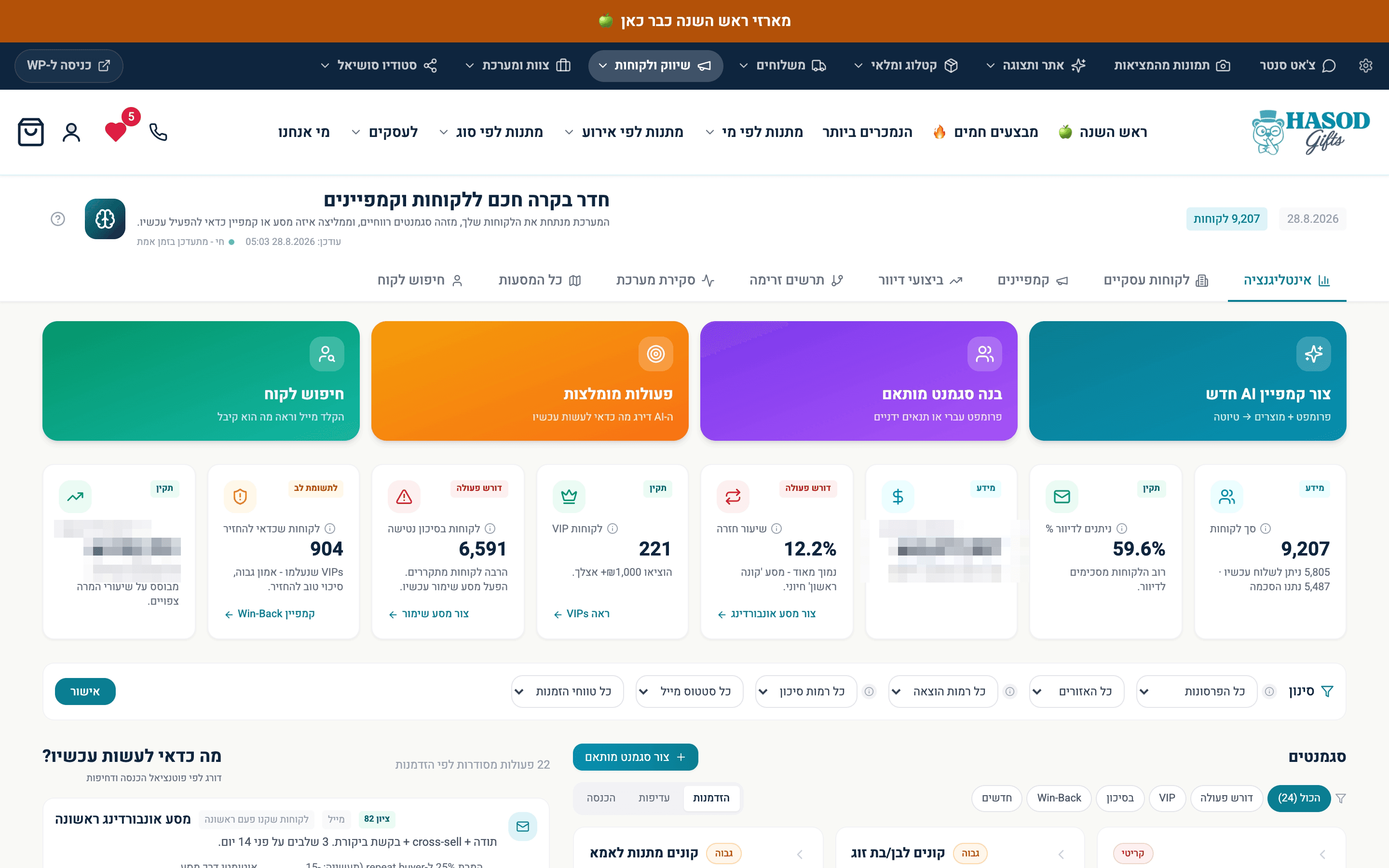
Here's a real screen: who's worth reaching.

Customers of the business MOVA was built on, sorted by how they actually buy: how recently, how often and how much. This is where you pick the audience for a campaign. Two revenue figures are blurred.

9,207 customers, sorted by who should hear from you and why. 904 of them are worth winning back.A real screen from the system

9,207 customers, sorted by who should hear from you and why. 904 of them are worth winning back.

The system MOVA was built on

What the Marketing department does

  1. Works out what you can spend this month

    Live todayHow it works
    • The monthly marketing ceiling is the month's contribution before marketing, minus fixed costs. Next to it sits the MER needed to break even, against actual MER from real revenue, plus an alert when the business is losing money at this level of spend, whatever the platform reports. For now, this month's ad spend is entered by hand.

      LIVEmarketing-ceiling-mer

  2. Knows what an order can cost

    Live todayHow it works
    • Enter a sale price, product cost, shipping and packaging, and get the break-even CPA, a recommended target with a safety margin, the ROAS that target needs, and how many sales the budget should bring in. A target past break-even is flagged as critical.

      LIVEcampaign-budget-economics

  3. Measures ROAS from money that actually came in

    Live todayHow it works
    • Every morning at 08:00, an email lays out yesterday by channel: paid orders, revenue and ROAS, based on revenue that was paid and invoiced, not on the platform's report, with the break-even line in color. Google and organic costs are fixed amounts set in advance and marked that way. If Meta spend wasn't pulled, the cost stays blank and the email says so.

      LIVEchannel-roas-daily-mail

  4. Knows where each order came from

    Live todayHow it works
    • Each order gets a source label in Hebrew, a campaign name when there is one, and a confidence level: high with campaign tagging and a click ID, medium with tagging only, low with just a referrer. You see where orders came from, and how far to trust the answer.

      LIVEorder-source-classifier

  5. Sends every purchase to Meta from the server

    Live todayHow it works
    • The moment payment is confirmed, a signed purchase event goes to Meta from the server, even if the customer closed the browser before reaching the thank-you page. Each purchase is sent only once.

      LIVEcapi-server-purchase

  6. Builds a content plan two weeks ahead

    Live todayHow it works
    • Pick a period, a goal and channels, and get a full post plan: a hook, message, audience and reason for every post, plus a separate version for each platform. The plan is saved to the content calendar to wait for approval, and each post gets a quality score with the reasons it lost points. If the model fails, you still get a full plan instead of a blank screen.

      LIVEsocial-content-planner

  7. Shoots the product without a photographer

    Live todayHow it works
    • Put a supplier's phone photo into the product editor and get three studio shots of the same product, from three camera angles. Branding, printed text and the logo on the packaging stay exactly as they are, because the product isn't supposed to change.

      LIVEwp-gemini-product-photography

  8. Knows what's worth promoting

    Live todayHow it works
    • For each product, the system learns how much labor time it takes and works out what it really leaves you, so the products worth promoting are the ones that leave the most, not the ones that sell the most.

      LIVElearned-prep-time-product-profit

  9. Knows what's stuck on the shelf

    Live todayHow it works
    • Two lists show every product that hasn't sold a single unit in the last 90 or 180 days, counting sales from before the current website, so an old product doesn't look new. From there, you can build it a promotion that still makes money.

      LIVEdead-stock-filter

  10. Where it's headed: video from the product itself

    Where it's headedHow it works
    • Today the system produces a content plan, a version for each platform and studio photos of the product. Video built from the same product and the same plan is the next step. It's not a screen you can open today.

      VISION

  11. Writes a campaign email from one request

    Live todayHow it works
    • Pick an audience, write what you want to say in Hebrew, and get a subject line, preview text and a designed email in your brand. Ask for different wording, warmer for example, and get a new version before you save.

      LIVEai-campaign-writer

Who the Marketing department talks to

What they decide together

Each row is one department and the decision their conversation leads to. Pick a row to see the conversation.

MarketingWebsite

Marketing doesn't take the ad platform's word for it. It goes by the checkout.

Illustration
  1. MarketingMeta says 38 purchases yesterday.
  2. WebsiteCheckout says 31 paid orders with a last paid click from Meta.
  3. MarketingSo the budget goes by 31, not 38.

The budget follows the money that actually came in.

Live todaySee exactly what runs
  • Every morning: paid orders and revenue by channel, attributed from data saved on each order, not from what the ad platforms report about themselves.

    LIVEchannel-roas-daily-mail

Open Website

The question we get about this department

How do you know what one order cost in ads?

Today, ad spend is measured by day and by channel, against orders that were actually paid. The engine that splits spend down to a single order is already written, but not connected yet. That's why the demo's advertising line is an allocation by ROAS, and it's labeled as one.

The data's all thereSee exactly what runs
  • Daily ROAS by channel is calculated from revenue that was paid and invoiced, credited to the last paid click within 7 days, not from what the platform reports about itself.

    LIVEchannel-roas-daily-mail

  • Every order carries a marketing cost in its profit calculation. If it has no ad cost of its own, a default amount set in advance goes in.

    LIVEorder-marketing-cost-in-profit

  • An engine that splits each ad's daily spend across the orders paid after a click on that ad is written and deployed, and most ad traffic is already tagged with the ad ID. The tables it writes to haven't been created yet, so it doesn't run today.

    DERIVABLEper-order-ad-cost-engine