
דילוג לתוכןSkip to content

People

Who's working, on what, at what cost, and what each person is good at.

Employees send their availability. Who builds the schedule?

Availability and scheduling

Who's sent their availability for next week?No answers, no schedule.

Everyone posts their availability, each in their own words.

In the team chatNext week's availability form

Demo data
  • NSun, Tue, ThuNot submittedSubmitted
  • REvery evening but WednesdayNot submittedSubmitted
  • SMornings only this weekNot submittedSubmitted
  • TFriday until 14:00Not submittedSubmitted
  • LSame as last weekNot submittedSubmitted
  • MNot submittedSubmitted
  • DNot submittedSubmitted
  • ONot submittedSubmitted

And three haven't sent anything yet.0 of 8 forms submitted

Then comes the typing: five formats, a blank table, and an hour of turning it all into a week.

The system does it in five steps:

  1. Wednesday 19:00The availability form sends itself

    Active employees get a link to a single form for next week. Fields instead of free text.

  2. Thursday 10:00 and 17:00Reminders go only to those who haven't submitted

    Anyone who's already submitted gets nothing more, and no one has to post in the group again.

In the team chatNext week's availability form

Demo data
  • NSun, Tue, ThuNot submittedSubmitted
  • REvery evening but WednesdayNot submittedSubmitted
  • SMornings only this weekNot submittedSubmitted
  • TFriday until 14:00Not submittedSubmitted
  • LSame as last weekNot submittedSubmitted
  • MReminderNot submittedSubmitted
  • DReminderNot submittedSubmitted
  • OReminderNot submittedSubmitted

And three haven't sent anything yet.7 of 8 forms submitted

  1. Thursday 20:00A draft schedule is built

    The week is built from the answers that came in, and any shift short on people gets flagged.

  2. After the draftYou fix and approve

    Move, swap, lock a cell. If the week isn't approved by Friday 08:00, you get a reminder.

Next week

Demo dataEmptyDraft readyApproved
SunMonTueWedThuFri
AM3/33/33/33/33/32/3
PM2/22/22/21/22/22/2

2 shifts still need cover, and they're flagged

Fixed by hand

  1. After approvalOne click sends the schedule to assigned staff only

    Everyone on the schedule gets their shifts by SMS or WhatsApp.

Final schedule sent

  • NSMS
  • RSMS
  • SSMS
  • TSMS
  • LWhatsApp
  • MSMS
  • DSMS
  • ONo shifts

Thursday is just Thursday again.

Live todaySee exactly what runs
  • Scheduled jobs run the whole weekly cycle. Wednesday at 19:00, a new week opens and a form link goes to every active employee set up to receive it. Thursday at 10:00 and 17:00, a reminder goes only to those who haven't submitted. Thursday at 20:00, a draft is built and a message asks for approval. Friday at 08:00, a reminder goes out if the week still isn't approved. Once it's approved, one click sends the final schedule by SMS or WhatsApp, only to the employees who were assigned. The times are set for summer time: when the clocks change to winter time, they all shift by an hour until someone updates them by hand.

    LIVEweekly-shift-crons

  • The draft is built from the availability each employee marked, using fixed rules: a weekly cap per person, no double-booking within a shift, and a fair split. A shift that can't be staffed within the rules gets a warning rather than a forced assignment, and you fix it and approve.

    LIVEauto-shift-scheduler

  • A 6-day board, mornings and evenings, with each cell colored by its state, including shifts that are short on staff. Locked cells and manual assignments stay put even when the schedule is rebuilt.

    LIVEshift-board-colors-locks

That was the demo.

Here's the real schedule.

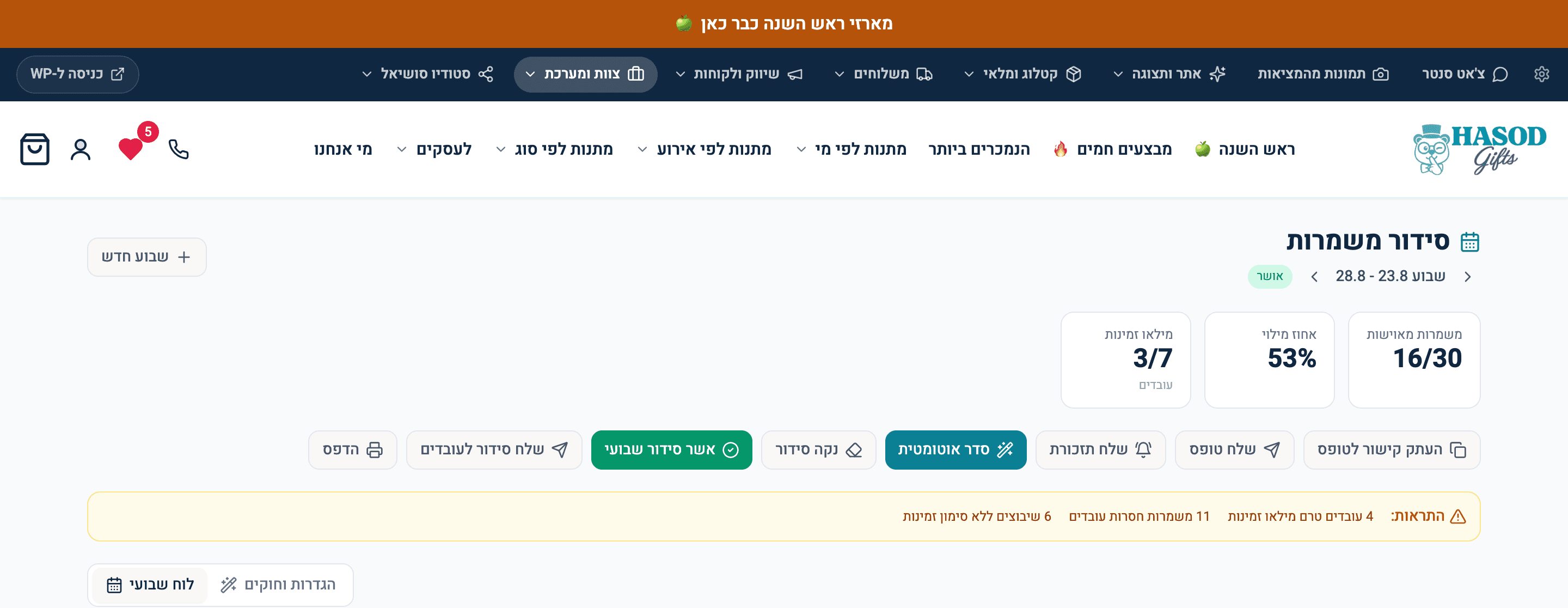
The schedule screen at the business MOVA was built on: how many shifts are approved so far, how many availability forms are still missing, and where you're short on people. The capture is cropped above the shift grid because the grid shows employee names.

16 of 30 shifts approved. 4 employees have not filled in their availability yet, and 11 shifts are missing.A real screen from the system

16 of 30 shifts approved. 4 employees have not filled in their availability yet, and 11 shifts are missing.

The system MOVA was built on

What the People department does

  1. Builds the schedule from availability

    Live todayHow it works
    • A draft schedule for the whole week is built from the availability each employee marked. The hardest shifts to staff get filled first, the split is fair, and everyone has a weekly cap. A shift with no cover gets a warning instead of a forced assignment, and you fix it and approve.

      LIVEauto-shift-scheduler

  2. The availability form never closes

    Live todayHow it works
    • Employees can update their availability at any time, even after the draft is built and even after the schedule is approved. No deadline locks the form and sends them back to WhatsApp. The manager reruns the automatic schedule or fixes it by hand.

      LIVEavailability-form-never-closes

  3. One card per employee, with everything on it

    Live todayHow it works
    • Each employee has one card: the phone number messages go to, their hourly rate, whether they're active, whether they get the schedule link, and all their shifts. Wages, the schedule and the reports all draw from it. No spreadsheet on the side.

      LIVEclock-otp-kiosk

  4. Overtime under the law, minute by minute

    Live todayHow it works
    • A full month of clock-ins is broken down, minute by minute, into pay tiers: 8 hours a day at 100%, the next two hours at 125%, and 150% after that. The weekly hours threshold is checked too, and a minute already paid as overtime is counted only once.

      LIVEisraeli-overtime-engine

  5. Only a clean month goes to the accountant

    Live todayHow it works
    • One button sends your accountant the monthly hours report as a table in Hebrew, with an Excel file. The server won't send it while any clock-in is broken, like a clock-out that was never recorded, and the screen lists each one with a fix button. You can override only by marking it explicitly.

      LIVEaccountant-send-gate

  6. A time clock that texts a code

    Live todayHow it works
    • A tablet mounted at the business runs the clock. Pick your name, get a 4-digit code by SMS and you're clocked in. Pick your name again to clock out. The database blocks the same employee from having two open shifts at once.

      LIVEclock-otp-kiosk

  7. The owner gets hours and wages on the 2nd

    Live todayHow it works
    • On the 2nd of every month, without anyone clicking a thing, the owner gets a summary of last month's hours and wages on their phone, and the full report with an Excel file by email. Any employee without an hourly rate is flagged by name, and unusually long days are counted separately.

      LIVEowner-monthly-digest

  8. What each order cost in wages

    Live todayHow it works
    • For each employee, the screen works out how many shekels in wages one order took, using the hours on the clock and the orders they actually prepared. The number is only reliable once broken clock-ins are closed: a forgotten clock-out inflates the hours and skews the ranking, so the screen shows the clock-ins that need fixing first.

      LIVEemployee-efficiency-rank

  9. What each person is good at, product by product

    Live todayHow it works
    • A report for each employee: how many orders they prepared, how long it took, what it cost, and which products they're faster or slower on than the team average for that exact product. A product joins the comparison only after at least 2 units, so nothing is concluded from a single data point.

      LIVEemployee-productivity

  10. Shabbat, by actual sunset

    Live todayHow it works
    • Work on the weekly rest day is identified by that date's sunset, calculated inside the system, and paid at 150%, 175% and 200%. The window opens at sunset on Friday and closes 30 minutes after sunset on Saturday.

      LIVEshabbat-sunset-window

Who the People department talks to

What they decide together

Each row is one department and the decision their conversation leads to. Pick a row to see the conversation.

PeopleOrders

Someone starts packing an order. Now it has a labor cost.

Illustration
  1. PeopleClocked in at ₪42 an hour.
  2. OrdersOrder 18421: 6:40 to pack, two products.
  3. OrdersLabor on this order: ₪4.70, counted in its profit.

Real labor cost on every order, not an estimate.

Live todaySee exactly what runs
  • Pack five orders at once and you aren't counted five times. Overlapping time is split across the active orders, so total labor cost exactly matches the wages paid.

    LIVEconcurrency-aware-labor-cost

Open Orders

The question we get about this department

Won't this turn into a way to police employees?

The comparison runs product by product, against the team on that exact product. So you see the pace is slow on one gift box and fast on three others. The conversation becomes about a prep step or a work tool, and less about the person.

The data's all thereSee exactly what runs
  • Each employee gets a personal product table, compared to the team average on the same product, with a minimum of 2 units. It shows their three fastest products and three slowest, and an order several employees worked on is split between them by each person's minutes.

    LIVEemployee-productivity

  • Comparing an employee with their own pace on the same product over time uses data that's already measured and stored. It has no screen yet.

    DERIVABLE