
דילוג לתוכןSkip to content

Orders

Every order from checkout to courier: who prepares it and how long it takes.

An order just came in. Who prepares it, how long should it take, and how do you know it went out right?

One order, queue to courier

An order came in.Now what?

  1. An order arrives.

    Two items, one with text to engrave. No one has touched it yet.

    Order 18421

    Birthday gift box

    Demo data
    NewPrepared byDDani
    • Large pampering box×1
    • Engraved glass×1
  2. Who prepares it?

    It only goes to someone who's clocked in, with at most two orders in prep per person.

    Demo data

    Who can take it now

    1. DDaniOn shift · 1 in prep
    2. NNoaOff shift
    3. YYoavOn shift · 2 in prep

    Assigned to Dani

  3. The clock just starts.

    Assigning it starts the timer. Next to it: how many minutes this order should take, based on the history of its products.

    Prep time

    6:40

    On timeStopped at dispatch

    0:00Expected 8:00Over 12:00
  4. It's all right there.

    Which shelf, how to prep it, and the engraving text reversed too, ready to copy.

    • Large pampering box

      Shelf B-3×1

      Prep instructions

      Tissue paper on the bottom, note on top of the ribbon.

    • Engraved glass

      Shelf A-1×1

      Prep instructions

      Engrave on the inside, then check it against the light.

      Engraving text

      Love you, Mom

      Reversed, ready to copy

      moM ,uoy evoL

  5. Off to the courier.

    The clock stops and a shipping label comes out of the printer. If there's a greeting, a QR sticker prints too. Nobody hit print.

    Send to courierDispatched · tracking number on the order

    Label printer

    Illustration

    Shipping

    Tel Aviv

    Home delivery

    Order 18421

    Greeting inside

    Scan me

    Order 18421

Out on time.

6:40 of prep time, and nobody logged a thing.

Next, four departments pick it up:

  • ShippingLabel, courier and tracking
  • PeopleMinutes and labor cost
  • FinanceProfit per order
  • ServiceStatus into the site chat
See these conversations
Live todaySee exactly what runs
  • Orders only go to employees who are clocked in right now, with at most two orders in prep per person. Anyone off shift shows as unavailable in the assignment list, and any override of the rule is logged.

    LIVEshift-gate-cap

  • Assigning an employee to a new order moves it to "in preparation" and starts a work timer. Dispatching it to shipping or completing it stops the timer, and any other status change pauses it.

    LIVEops-driven-prep-timer

  • When prep starts, the system works out how many minutes the order should take, based on the last 90 days of prep for its products, and attaches that number to the order. From then on you see whether it's on time, slower than average, or running over.

    LIVEexpected-minutes-race

  • Each item in the order shows its shelf and how to prepare it. The text is written once on the product card, and only the team sees it.

    LIVEprep-instructions-bin

  • When a customer writes a dedication or engraving text, the same text appears next to it reversed, line by line, and one click selects all of it for copying.

    LIVEmirror-inscription

  • The moment an order is dispatched to the courier, the thermal printer prints a shipping label, plus a second QR sticker if the customer included a greeting. Nobody has to press print.

    LIVEdispatch-two-stickers

  • One button on the order lets you pick from four carriers. The system creates the shipment, saves the tracking number and updates the status.

    LIVEmulti-carrier-dispatch

That was the demo.

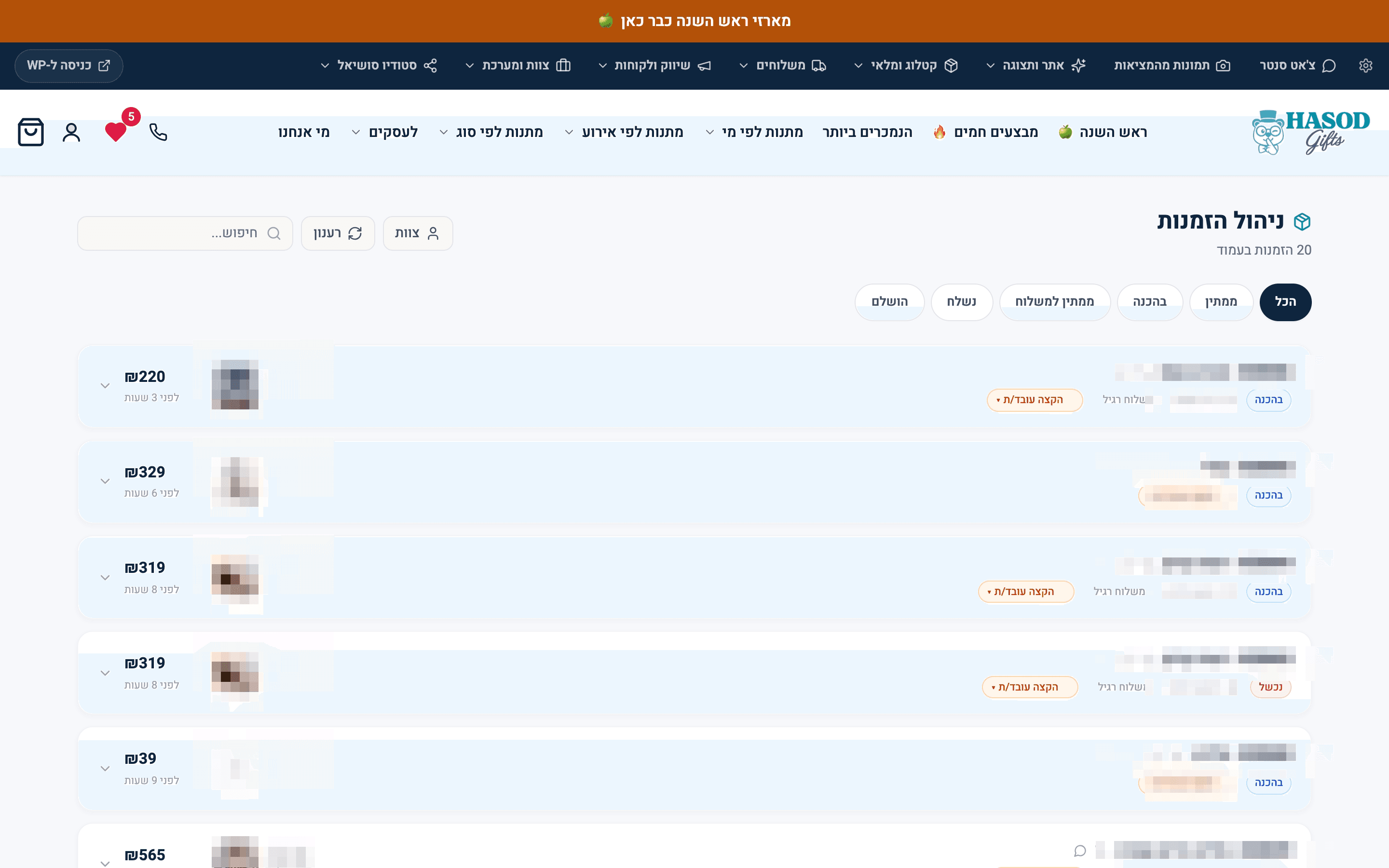
Here's the real orders screen.

Every order at its current stage, with the amount and the assigned employee, plus a tab for each stage. Customer names, order numbers and product images are blurred.

All of today's orders, with the status and the employee responsible for each one.A real screen from the system

All of today's orders, with the status and the employee responsible for each one.

The system MOVA was built on

What the Orders department does

  1. A prep timer that starts itself

    Live todayHow it works
    • Assigning an employee to a new order moves it to "in preparation" and starts a work timer. Dispatching it to shipping or completing it stops the timer, and any other status change pauses it. Nobody on the team has to log a start or a finish.

      LIVEops-driven-prep-timer

  2. Every order vs. its expected time

    Live todayHow it works
    • When prep starts, the system works out how many minutes the order should take from the last 90 days of its products, and saves that number on the order. From then on you see whether it's on time, slower than average, or running over. With no history at all, the screen says there's no average yet instead of guessing.

      LIVEexpected-minutes-race

  3. Orders only go to people on shift

    Live todayHow it works
    • Orders only go to employees who are clocked in right now, with at most two orders in prep per person. Anyone off shift shows as unavailable in the assignment list, and any override of the rule is logged.

      LIVEshift-gate-cap

  4. Shelf and prep notes on every line

    Live todayHow it works
    • Each item in the order shows its shelf and how to prepare it, written once on the product card. The team sees it. The customer never does.

      LIVEprep-instructions-bin

  5. Posters missing a print file get caught in time

    Live todayHow it works
    • Every fifteen minutes, the system looks for paid custom-poster orders where the customer uploaded photos on the site but there's no print file. When it finds one, it sends a text message, adds a note to the order and attaches a backup print link.

      LIVEposter-sketch-watchdog

  6. One order, twenty addresses

    Live todayHow it works
    • A business customer places one order and splits delivery across dozens of recipients. The order breaks into parcels, each with its own address, greeting and delivery, and shipping is calculated per drop instead of once for the whole order.

      LIVEsplit-order-multi-ship

  7. Tasks go from the conversation straight onto the order

    Live todayHow it works
    • While talking with a customer, a rep writes a task that attaches to the order line itself: add a greeting, change a color, move it to another day. Whoever prepares the order sees it right on the line, not in a message buried in a group chat.

      LIVEorder-quick-task-from-chat

  8. Email orders come in on their own

    Live todayHow it works
    • Every 12 minutes, the system reads the mailbox, finds new orders from an external gifting platform and turns each one into a real store order, with products, recipient and greeting. Each order is imported exactly once.

      LIVEgiftush-email-to-order

Who the Orders department talks to

What they decide together

Each row is one department and the decision their conversation leads to. Pick a row to see the conversation.

OrdersService

A customer asks in chat: will the gift box arrive by Friday?

Illustration
  1. ServiceCustomer: Will my mom's gift box get there by Friday?
  2. OrdersOrder 18421 is packed and already with our courier.
  3. ServiceReply: It went out today with our courier and arrives today.

A precise answer, because the chat doesn't guess. It reads the order.

Live todaySee exactly what runs
  • When a customer asks when an order will arrive, the chat answers from its real status: whether packing has started, which carrier has it and when it shipped. It never promises something that hasn't happened yet.

    LIVEarrival-truth-engine

Open Service

The question we get about this department

Is this just another screen for the team to run?

Your team takes an order, prepares it and sends it to the courier, same as always. The clock starts at assignment and stops at dispatch, and the stickers print without anyone pressing print. No start form, no finish form.

Live todaySee exactly what runs
  • Assigning an employee to a new order starts the work timer, and dispatching it to shipping stops it. If the start signal got lost, the finish rebuilds the record.

    LIVEops-driven-prep-timer

  • The moment an order is dispatched to the courier, the thermal printer prints a shipping label, plus a second QR sticker if the customer included a greeting. Nobody has to press print.

    LIVEdispatch-two-stickers