
Axel
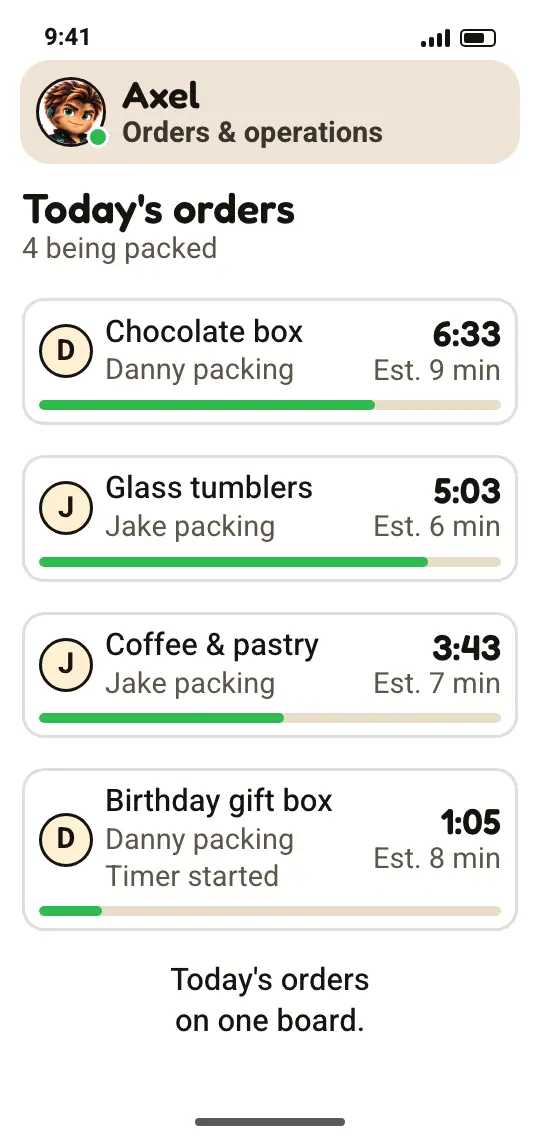
Joins one department at a timeOrders & operations
- Basic: A daily order board: what came in, what's being packed, and what shipped
- Premium: Orders go only to the people on shift
Ecommerce operations
Ecommerce operations software is where a store runs its day: orders, shipping, inventory, customers, and supplier invoices. MOVA puts all of it in one admin connected to your site, so a sale updates your stock on its own. It's part of the $149/month base, and US stores get it from launch day.
$149/month for your new site, the admin, and all 11 agents at Basic. Live in 7 days from access to your current site, or your first month is free.
Inventory updates with every order
At Premium, orders go only to staff on shift
The order board is Basic. Giving orders only to the people on shift, and the automatic timer, come with Premium.
01The definition
Ecommerce operations software is where you see and do the daily work of an online store: what was ordered, what's in stock, what shipped, who the customer is, and what came in from suppliers. In a small store, that work is usually spread across apps, spreadsheets, and inboxes, and each one knows only part of the story.
In MOVA, it's one admin, connected to your site. An order placed on your site updates your inventory, waits on the shipping board, and joins the customer's history, and supplier invoices sit in the same place. Every part updates the others.
A sale on your site comes off your inventory, without typing it in again.
The order, the shipment, and the customer, on the same screen.
An order you open on your phone is the same order on your computer.
02The parts
What's spread across apps today, in one place. Each part updates the others.
Every order in one place, from payment to delivery. A direct link to your shipping carriers comes with Jett at Premium, where your provider allows it.
Purchase orders to suppliers, receiving, and stock that updates with every order on your site.
Every customer with their orders and history, plus leads from your site and chat.
Invoices and receipts from suppliers, kept in one place. Reading them from a photo, line by line, comes with Pixie (10 a month at Basic).
Customer emails, including automatic ones, and a chat that answers on your site at any hour.
Products, variations, categories, coupons, and free shipping, all edited by you, with no code.
A time clock with a personal code for up to 3 staff, an hours report, and team tasks. Mimi at Premium covers 10 staff and builds shifts from availability.
Edit the home page banner and slider yourself, and see how much profit the store makes.
All eight run every day at Hasod, the online gift store in Israel where we built MOVA, and every store gets them in its admin from launch day.
03One order
Here's how an order moves through the admin, from the moment it's placed on your site:
New order from your site. It's on today's board.
It's on the shipping board, waiting for pickup.
Green: updated on its own, no typing
04Switching
You don't have to stop the store. Three steps, and your current site keeps selling until the new one is ready.
IllustrationThe rows on the cards are examples
Your products, photos, pages, and content move to the new site, and from launch day every new order comes into one admin.
Your payment processor and shipping carriers are connected during setup, where your provider allows it. Other software, like accounting? We look at it on the first call, and MOVA can work alongside it.
On a computer or a phone. Whoever packs, answers customers, or handles invoices works in the same admin.
05Who works in it
The admin works without them. With them, it also prepares the work. This is how they work at Hasod today, with the level of each line:
Orders & operations

Inventory & purchasing

Shipping

Invoices & documents

Staff & scheduling

Finance & planning
Basic: included in the basePremium: Master: an upgrade for this agent
At your store, Maya answers customers in web chat from launch day, at Basic. The rest of the team works at Hasod today and joins one department at a time.
06Inside the admin
Shipping, supplier invoices, and checks, as they look at Hasod today. Each clip is an illustration, and under each one is the level it comes with.
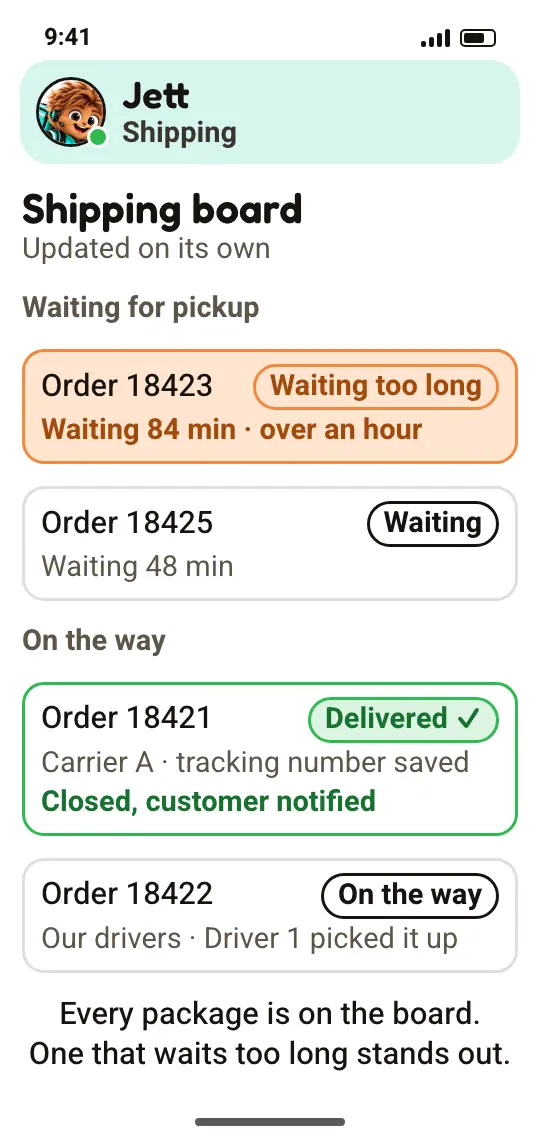
 Jett, Shipping
The board is Basic. Connecting your carriers (where your provider allows it) and closing delivered orders come with Premium.
Basic: Premium:
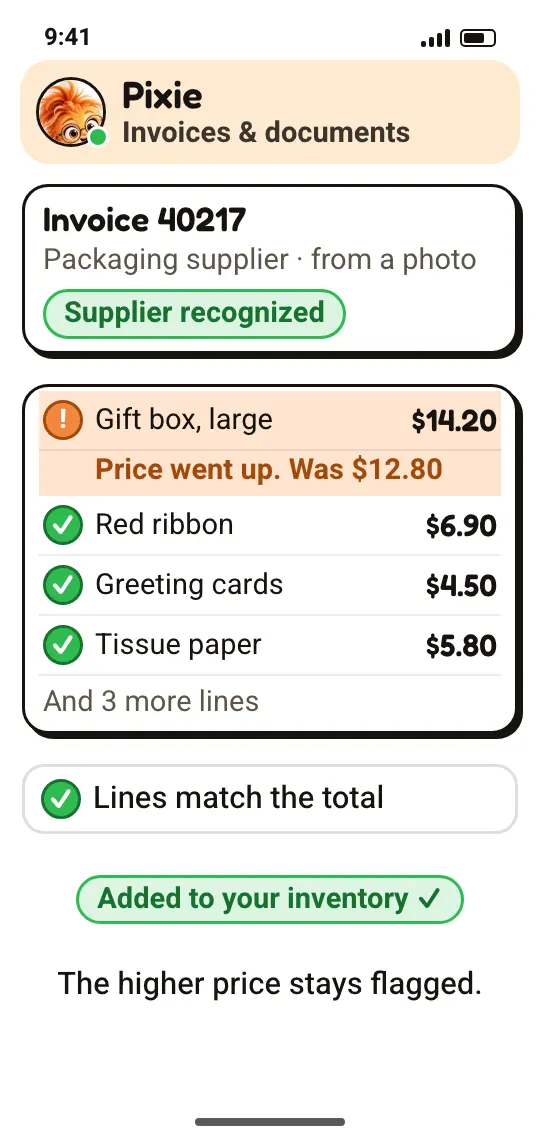
 Pixie, Invoices & documents
Reading invoices is Basic. Recognizing the supplier and adding stock come with Premium, and the price flag with Master.
Basic: Premium: Master:
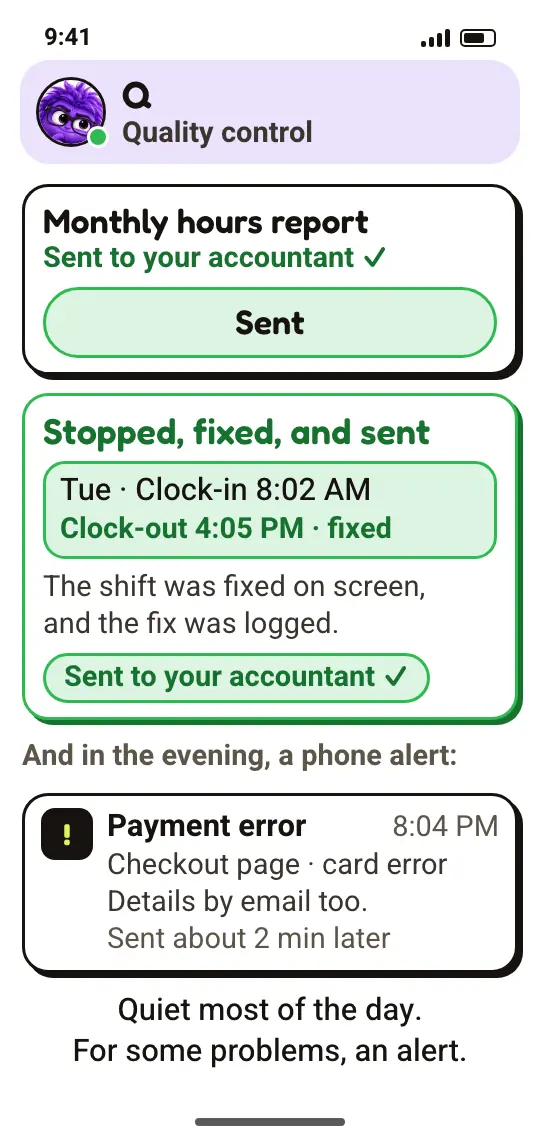
 Q, Quality control
Q is always included; each check starts when its department joins your store. The phone alert is a text, sent where your provider allows it. The details also go by email.
Always included:
At your store, Maya answers customers in web chat from launch day, at Basic. The rest of the team works at Hasod today and joins one department at a time.
07Who it's for
For a store that sells online and ships orders, whose day starts by opening several apps.
08Price
The admin is part of the base: $149/month before sales tax, together with your new site, hosting, upkeep, and all 11 agents at Basic. No per-user pricing. AI usage is included in normal volume. No credits to buy. Setup and the move are a one-time fee, quoted after a short call.
The base, every month
$149/month
before sales tax
Live in 7 days from access to your current site, or your first month is free. No long-term contract. Cancel any month. The setup fee covers work already done, so it isn't refunded.
Basic is included in the base. Premium and Master are upgrades for this agent only.
BasicIncluded in the base
Premium$49/month
Master$79/month
Everything in Premium, plus:
As of Oct 2026. Prices are before sales tax where it applies.
At your store, Maya answers customers in web chat from launch day, at Basic. The rest of the team works at Hasod today and joins one department at a time.
As of Oct 2026. Prices are before sales tax where it applies.
09More solutions
Each page answers one question store owners ask. Here are the others:
10Questions
Your payment processor and shipping carriers are connected during setup, where your provider allows it. For anything else, like accounting software, we look at it together on the first call, and MOVA can work alongside it. At Hasod, MOVA connects to WooCommerce, Meta, Google Analytics, and email.
Yes. It's one admin on every screen: an order you open on your phone is the same order on your computer, with no separate apps.
No. You manage products, categories, coupons, and promotions in the admin, and edit the home page banner and slider yourself, with no code.
Yes. Whoever packs, answers customers, or handles invoices works in the same admin, and there's no per-user pricing. The admin has a secure sign-in, and each staff member clocks in on the time clock with a personal code: up to 3 staff at Basic, 10 with Mimi at Premium, and 20 at Master.
Your store's data belongs to you. No long-term contract. Cancel any month. The setup fee covers work already done, so it isn't refunded. If you leave, you get a full export of your store's data within 14 days.
We use your data only to run the service and never share it, except with the infrastructure, AI, and messaging providers that run it. Your store's data lives in its own database. It belongs to you.
It starts with a short call with a person, and a fixed quote for the setup and the move.
Live in 7 days from access to your current site, or your first month is free.
A short call with a person, not a bot. We learn how your store runs, and you get a fixed quote for the setup and the move.
Live in 7 days from access to your current site, or your first month is free.
The 7 days start when we have access to your current site and all your materials. Time spent waiting for your approvals or materials doesn't count.
No long-term contract. Cancel any month. The setup fee covers work already done, so it isn't refunded.
US stores are joining as early access.